![Storagely-Final-Logo_lores-1536x339.png]](https://support.storagely.io/hs-fs/hubfs/Storagely-Final-Logo_lores-1536x339.png?height=40&name=Storagely-Final-Logo_lores-1536x339.png)
In order for Storagely to integrate with your SiteLink account, you will need to edit or create a user for Storagely within SiteLink.
Here's how:
Step 1:
Login to SiteLink Corporate Control Center
Step 2:
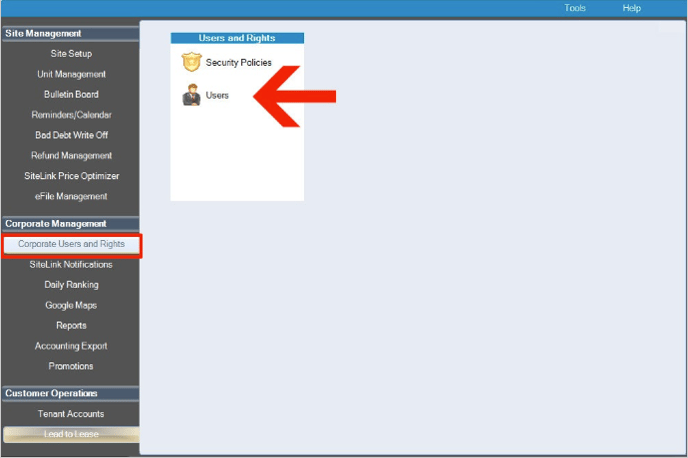
Click "Users" under the "Corporate Users and Rights" tab in the Corporate Management section.
Step 3:
Click "Add" to create a new user or "Edit" if already exists

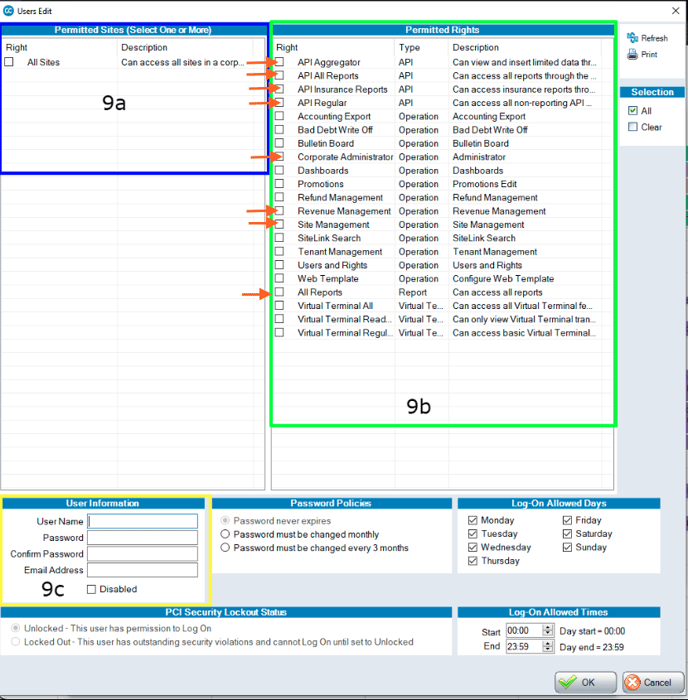
Step 4: (see below figures)
-
In the 9a box select "All Sites'
-
In the 9b boxselect:
-
API Aggregator
-
API All Reports
-
API Insurance Reports
-
API Regular
-
Corporate Administrator
-
Revenue Management
-
Site Management
All Reports
-
-
In the 9c box:
-
Enter a username:
enter "storagely" -
Enter password:
make sure the password is strong. Generate strong password here.-
***Make sure you save this password somewhere so you can send it to Storagely.***
-
-
Confirm Password:
enter the same password from the previous field -
Email Address:
enter "access@storagely.io"
Then click "OK" in the bottom Right. -
FINAL STEP:
Once you've completed this step, please add the login credentials to your Account Manager.
If you have any questions or concerns, do not hesitate to ask!